Master Your Wedding Timeline with These Canva Templates
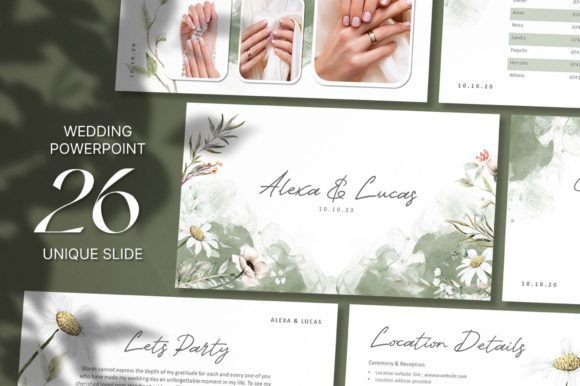
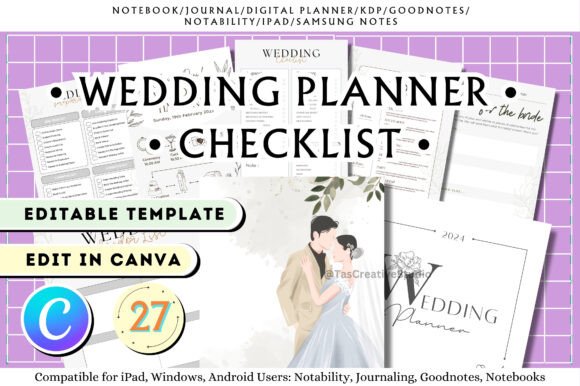
Organizing a wedding involves juggling a thousand moving parts, and the last thing you need is a design roadblock when trying to create your stationery. That is exactly where this collection of Wedding Planner Canva Templates shines. Instead of staring at a blank screen trying to figure out layout spacing or font pairing, you get a cohesive suite of 27 pre-designed pages. The visual style here leans heavily into a modern, airy aesthetic. You will notice a lot of white space, soft pastel tones, and clean lines. It doesn't scream "traditional wedding" with heavy gold foil and cursive scripts; rather, it feels like a contemporary lifestyle brand—fresh, organized, and incredibly easy on the eyes.
The personality of these templates is practical elegance. It is designed for the modern couple who values organization just as much as aesthetics. Whether you are a professional wedding planner handing these off to clients or a bride managing her own timeline, the design language remains consistent. The background colors are muted, usually sticking to soft blues, pinks, and neutral creams, which ensures that the actual content—the dates, the times, the menu choices—remains the hero. This makes it a fantastic asset for anyone in the wedding industry who needs to present information clearly without sacrificing style.
Practical Applications for Designers and Planners
As a creative professional, you know that the utility of a template lies in its flexibility. This is not just a single file; it is a comprehensive toolkit. The list of included pages covers every possible scenario in the wedding planning process. You have the heavy hitters like the Budget Planner, Guest List, and Vendor List. These are the functional backbones of any wedding file. However, the inclusion of specific pages like the Venue Comparison sheet and the Expenses Checklist shows a deep understanding of the actual user experience.
From a branding perspective, these templates offer a massive advantage for wedding planners. If you are running a boutique planning business, consistency is key to your brand identity. By using this suite, you can ensure that every document your client receives—from the initial Planning Checklist to the day-of Wedding Program—looks like it came from the same professional source. The ability to edit elements, text colors, and fonts in Canva means you can seamlessly swap out the default colors for your client’s wedding palette or your own agency’s brand colors in just a few clicks.
Here is a quick look at how specific pages can be utilized in real-world scenarios:
- The Vendor List & Contact List: These are essential for the logistics phase. A designer can use these to create a "Little Black Book" style document for their clients, organizing florists, caterers, and photographers by category.
- The Wedding Timeline & Itinerary: These pages are critical for the day of the event. You can edit these to create a minute-by-minute schedule for the bridal party and the vendors. Having a visually clear timeline prevents chaos during the ceremony and reception.
- Advice For The Bride & Rehearsal Dinner: These add a personal touch to the planning process. They work beautifully for engagement parties or bridal showers where guests might be contributing advice or where rehearsal logistics need to be shared.
Design Flexibility and Editing Capabilities
One of the strongest features of this package is the emphasis on editability within Canva. Canva has become a standard tool for non-designers and professionals alike because of its low barrier to entry. These templates leverage that platform perfectly. The "What Can Be Edited?" section is crucial here: you have full control over Text & Text Color, Fonts, Elements, and Background colors.
Let’s break down why this matters for your final output. If you are working with a serif font for a traditional, high-end wedding vibe, you can upload that specific typeface to Canva and apply it across all 27 templates instantly. Conversely, if the wedding has a boho-chic vibe, you might switch to a handwritten font for headers while keeping the body text as a clean sans-serif for readability. The templates are built with a solid grid structure, so even if you start swapping elements around, the visual hierarchy remains intact. You are not fighting the design to make it work; you are simply customizing the surface layer.
The inclusion of a FREE set of 5 Pages Sticker Book in Soft Blue and Pink is a thoughtful addition. In the digital planning world, stickers are functional decoration. They help break up text-heavy pages and provide visual cues. For example, using a heart sticker on the RSVP page or a gift box icon on the Save The Date page adds personality. These are not just throwaway extras; they are design assets that enhance the usability of the planner.
Maximizing the Suite for Different Occasions
While the core subject is weddings, the structure of these templates allows for creative repurposing. The To-Do List and Checklist templates are universal. A marketing professional could adapt the Budget template for a project expense report. A blogger could use the Advice For The Bride layout to create a "Reader Q&A" page in a magazine-style PDF.
However, for the intended purpose, the coverage is exhaustive. Consider the Wedding Reception and Take Your Seat templates. These are often the most stressful items to produce last minute because they require precise data (table numbers and guest names). Having a pre-formatted design ready to go means you are simply typing in names rather than drawing lines and aligning text boxes at 11 PM the night before the wedding.
The Our Vows page is another standout. This is a keepsake item. By formatting this on a clean, elegant template, you transform a Word document into a piece of memorabilia that the couple might frame later. The design here needs to be timeless, avoiding trendy graphics that will look dated in five years. The neutral, soft aesthetic of this template suite ensures that the focus remains on the words.
Final Thoughts on Workflow and Efficiency
Ultimately, this collection of Wedding Planner Canva Templates is about efficiency. It removes the friction of design decision-making from the planning process. You do not need to be a graphic designer to produce professional-looking wedding stationery and planning documents. The typography is already balanced; the margins are set; the color palette is harmonized.
For the small business owner or the hobbyist crafter, this represents a significant time saving. Instead of spending hours building a Wedding Menu from scratch, you simply select the page, update the text with your specific courses, and export. The fact that it is undated makes it a timeless asset—you can use it for weddings happening next month or next year without worrying about calendar dates being wrong.
By following the creator and staying updated, you ensure that your toolkit grows. Design trends shift, but the need for organized, beautiful planning documents remains constant. This suite provides a solid foundation that balances aesthetic appeal with the rigorous functionality required to execute a flawless event. Whether you are managing a Wedding Goals board or finalizing the Wedding Preparations, having a unified visual system makes the entire process smoother and more enjoyable.